Hi WriMos,
I’m Steve Shepard, the developer of Storyist. One of the remarkable things about NaNoWriMo is that it doesn’t cost anything to take part. The NaNoWriMo folks cover their costs through donations and sponsorships. And that is where we can help. I’m proud to announce that Storyist Software is an official sponsor of NaNoWriMo again this year.
Since November is fast approaching, and, like many writers, you’re probably trying to decide what software you’re going to use to write your novel, I’ve put together some information about why you should consider Storyist. Feel free to ask questions on Twitter, Facebook, or in the Storyist Forums.
And good luck with your novels!
-Steve
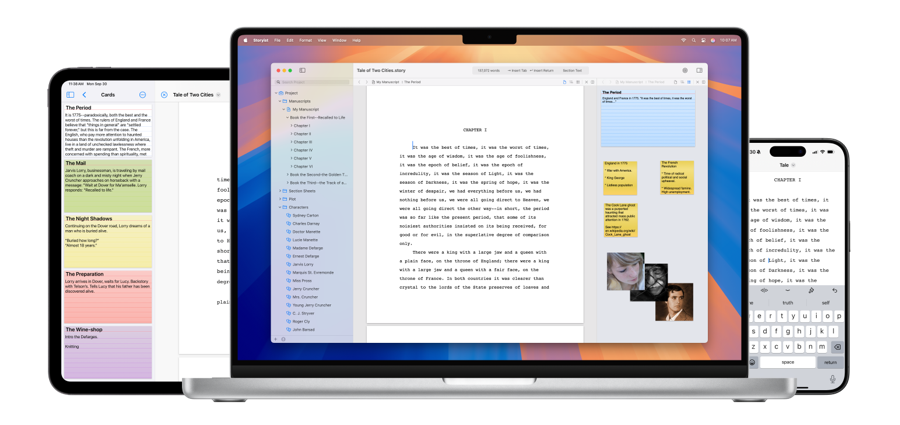
Storyist is a writing environment for novelists. Unlike generic word processors,
Storyist helps you track your plot, characters, and settings,
and keeps all of your writing organized and accessible—
so you can focus on your manuscript.
Storyist provides the word processing tools you expect from a top-notch creative writing application, including page layout and support for headers, footers, and style sheets.
With the built-in outliner in Storyist for macOS, you can work with your manuscript, plot threads, cast, and settings in outline form. You can even color-code your outline to get a high-level view of your story.
The storyboarding tools in Storyist let you sketch out a story using index cards and then refine it with customizable plot, character, and setting sheets.
The Writing Goals inspector in Storyist for macOS makes it easy to track your daily writing goals.
Storyist for macOS can create print-ready PDFs for publishing popular self-publishing services.
Storyist works great with iCloud, Dropbox, and other cloud storage services. If you store your files in the cloud, your files are always available on any of your devices.
“What are you writing this year?” It’s the question on everyone’s lips at the regional NaNoWriMo kickoff parties. The answer, even among seasoned NaNoWriMo veterans, is often “I don’t know.” If you don’t know either, relax—you’re in good company. Read »
So you’ve downloaded Storyist for macOS, familiarized yourself with the new features, and maybe spent some time planning your novel. Great! Here are a couple of additional suggestions to help you get the most out of Storyist for macOS during NaNoWriMo. Read »
In the standard format, section text is double-spaced, left-aligned, and set in 12-point Courier font. The first line of a paragraph is indented one half inch, or 5 characters, from the margin. The margins are set so that there are 25 lines per page. Read »
Storyist has a flexible style system to help you easily format your work. This tutorial walks you through the style-related features and provides tips and tricks to help you get the most out of them. Read »
Use this handy tutorial (with sample files) to learn how to create a print-ready PDF. Storyist’s PDF book editor lets you add front matter, specify verso/recto pages, and set trim size, margins, and bleed. Read »
If your book calls for something a little different, you can use the built-in templates as a starting point for your own designs. This step-by-step tutorial (with sample files) shows you how. Read »


 Storyist